Dev Proxy Tools
io.github.dev-proxy-tools由 GitHub 账号 dev-proxy-tools 发布v0.3.1更新于 Oct 24, 2026
MCP server for Dev Proxy that enables AI assistants to interact with Dev Proxy.
概览
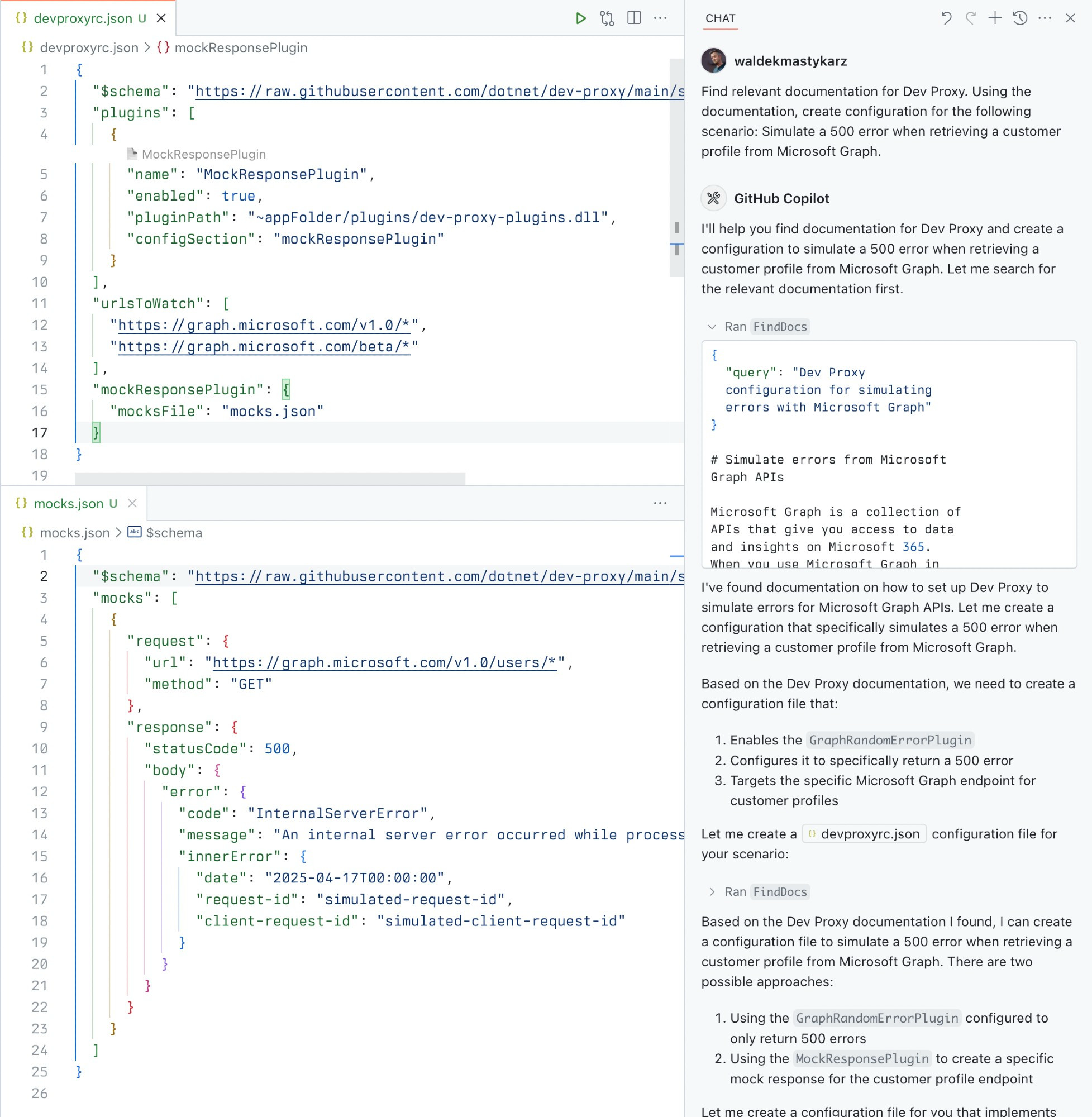
面向 Dev Proxy 的本地 MCP 服务器,让助手查询 Dev Proxy 文档、最佳实践和已安装版本,以协助编写配置。
- 可以做什么
- 按自然语言查询查找相关的 Dev Proxy 文档
- 获取配置和使用 Dev Proxy 的最佳实践
- 读取当前安装的 Dev Proxy 版本,以保证生成的配置兼容
- 适用场景
- 适用于使用 Dev Proxy(用于测试 API 错误处理、速率限制、慢响应和模拟 API 的 API 模拟器)的场景,希望助手基于其文档起草配置或回答问题。
- 运行要求
- 通过 npx 以 stdio 在本地运行,需要 Node.js LTS,并在本机全局安装 Dev Proxy。未声明任何环境变量或身份验证。
安装
在 SourceWeft 中
- 打开 控制台中的 Dev Proxy Tools,将其添加到工作区。
- 为需要使用其工具的对话启用该服务。
Desktop only,通过 STDIO。 STDIO 服务会启动本地进程,因此需要 SourceWeft 桌面宿主。
其他 MCP 客户端
参照 仓库 中的启动说明。
README
Dev Proxy MCP Server
[Install with NPX in VS Code] [Install with NPX in VS Code Insiders]
A Model Context Protocol (MCP) server for Dev Proxy that enables AI assistants to interact with Dev Proxy capabilities using the MCP standard. Use this server to:
- Create Dev Proxy configurations using natural language
- Get contextual help for working with Dev Proxy
- Discover Dev Proxy features and capabilities
What is Dev Proxy?
Dev Proxy is an API simulator that helps you effortlessly test your app beyond the happy path. It allows you to:
- Test API error handling: See how your app responds to API errors without changing your code
- Verify rate limit handling: Simulate API rate limits to improve user experience
- Test slow API responses: See how your app handles slow APIs to implement necessary affordances
- Create mock APIs: Quickly stand up mock APIs without writing code you won't ship
Dev Proxy works with any type of app and tech stack as it intercepts network requests at the proxy level.
What This Package Does
This package provides a Model Context Protocol (MCP) server interface to Dev Proxy. It allows AI assistants and other MCP-compatible clients to:
- Find Dev Proxy documentation using natural language queries
- Get the installed Dev Proxy version
Prerequisites
Usage
To set up and use the MCP server, refer to the instructions for your MCP host, such as Visual Studio Code. The Dev Proxy MCP server is published on npm under @devproxy/mcp.
Use the following values:
- Type:
stdio - Command:
npx - Arguments:
-y@devproxy/mcp
- Environment: none
[!TIP] If you want to test the preview version of the server using
@devproxy/mcp@next.
Connect with an MCP Client
This MCP server exposes the following tools:
GetBestPractices
Gets a list of best practices for configuring and using Dev Proxy. Call it for any code generation or operation involving Dev Proxy. These best practices do not change so once it has been called during the current session, you do not need to invoke it again.
FindDocs
Finds relevant Dev Proxy documentation related to a specific query.
GetVersion
Gets the currently installed Dev Proxy version. This is useful to ensure that the generated configuration is compatible with the installed version of Dev Proxy.
Development
Contributing
Contributions are welcome! Please feel free to submit a Pull Request.
- Fork the repository
- Create your feature branch (
git checkout -b feature/amazing-feature) - Commit your changes (
git commit -m 'Add some amazing feature') - Push to the branch (
git push origin feature/amazing-feature) - Open a Pull Request
License
This project is licensed under the MIT License - see the LICENSE file for details.
Related Projects
- Dev Proxy - The core Dev Proxy tool
- Model Context Protocol (MCP) - Protocol specification for AI assistant tools
来源:README.md,提交 4352a45
工具
0版本历史
1- v0.3.1最新Sep 16, 2026
评分
已满足适用检查项的 50%
该评分衡量此收录条目的完整程度,依据注册中心条目、端点与公开来源计算得出。它不是对服务器本身的评价,也不表示服务器安全或当前可用:可连通性是带日期的检查结果,评分也不包含安装量或用户评价。
- 近 30 天内可连通25 分
请保持端点能够响应 MCP 握手;SourceWeft 每 30 天探测一次。
- 已声明认证方式10 分
请在注册中心条目中声明凭据请求头,或保持端点能够响应探测,以便判定其认证方式。
- 已列出工具15 分
请让服务器在无凭据时响应 tools/list,或发布可在沙箱中无凭据启动的软件包。
- 描述必需15 分
- 图标10 分
- 文档15 分
- 许可证10 分